Saturday, August 9. 2008
I have returned to the workbench and here comes version 2.4.0: - The middle mouse button can now be used to pan around a document. This behaves just like the hand tool, but without having to change tools.
- The German version works better (i.e. it no longer crashes when trying to open a document for the first time, looking for a non existent folder).
- Fixed several issues with fonts and font handling. Even on machines with several thousand fonts, Creative Docs .NET now starts properly without exhausting the computer's resources first.
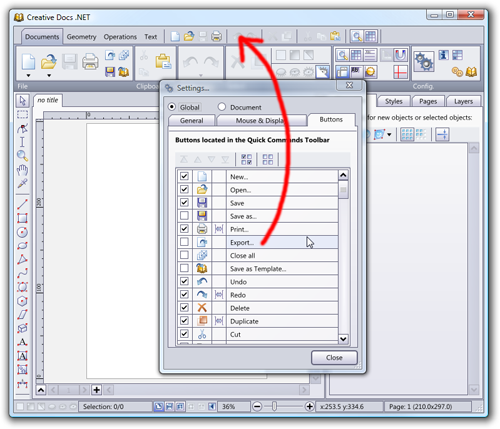
- Fixed the interaction with the quick toolbar (open the global settings by pressing F5 and switch to the Buttons tab, check the commands you often need to have them always available at the top of the window).

Enjoy...
Monday, June 30. 2008
Several users were not able to execute Creative Docs .NET on their system and I did not find any evidence as to why the application failed very early, before displaying anything at all. It happened on Windows 2000, XP and Vista, all the like. Even on Server 2003 and Server 2008.
[ if you experience the problem, try version 2.3.3 ]
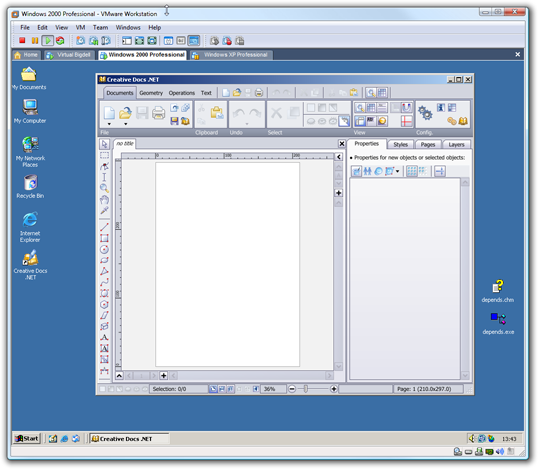
I checked everything on my VMware virtual test bed and was unable to reproduce the problem. Until Juan (thanks!) finally provided me with an image of his virtual machine, where Creative Docs .NET crashed, every time. He was using Microsoft's virtual machine, not Parallel's or VMware's, and he did not have the specific tools installed on it.
Tracking down the problem was not too long: after installing the .NET 2.0 SDK, I could attach the debugger and see what was happening. A DLL was unable to load (.NET is not really helpful: it simply reports COM error 0x800736B1). More specifically, AntiGrain.Net.dll was unable to load AntiGrain.Win32.dll, because AntiGrain.Win32.dll was referencing MSVCR80.dll. Hmmm. But I was sure that the MSI setup included a reference to the proper merge module (i.e. Microsoft_VC80_CRT_x86.msm). I was wrong.
At the beginning of the year, I migrated my development environment to a new 64-bit Vista machine, yet that machine has no Visual Studio 2005 installed, and therefore lacks the required merge module files in the C:\Program Files (x86)\Common Files\Merge Modules folder. For some reason, the setup now include Microsoft_VC90_CRT_x86.msm; the proper DLL was no longer installed. And on my virtual machines, the VMware tools had themselves installed the missing DLL!
Therefore, be aware that even on a "clean" virtual machine install, the virtual machine is no longer perfectly clean once you have installed the associated tools. At least, that's my only explanation as to what I was observing.
Friday, June 27. 2008
I decided to skip version 2.3.1 which was available in French only (see the EPSITEC web site if you are looking for a French version, named Crésus Documents, but basically the same as Creative Docs .NET).
Check out version 2.3.2.
Daniel improved the page and layer thumbnails and included drag and drop to reorganize them; pressing the CTRL or SHIFT key while dragging a thumbnail creates a copy of the page or layer. To speed things up, the miniatures are regenerated asynchronously.
Zooming with the scroll wheel has also become much more intuitive. The point of focus for the zoom is now always under the mouse; you no longer need to think about how Creative Docs .NET will zoom the document in and out: point and zoom, done.
Scaling arrows and rounded corners maintains the propoprtions.
And for all of you who are still using Windows 2000, I finally fixed the problem which prevented Creative Docs .NET to start on Windows 2000. For the programmers, a small hint: the SHELL32.DLL is said to export ILCombine and others, starting from version 5.00 of the DLL, yet in my experience, this is not always the case on Windows 2000 SP4. Some users on the net solved the problem by importing the entry point using [DllImport("shell32.dll", EntryPoint="#25")], but this did not work for me. So I reimplemented the missing IL functions in C#.
[note: IL has nothing to do with intermediate language but refers to a SHELL32 structure known as ITEMIDLIST, used to describe a path to a file or folder]
Monday, June 2. 2008
Daniel spent a few days adding an interesting new feature to Creative Docs .NET. You should download version 2.3.0 now to get access to...
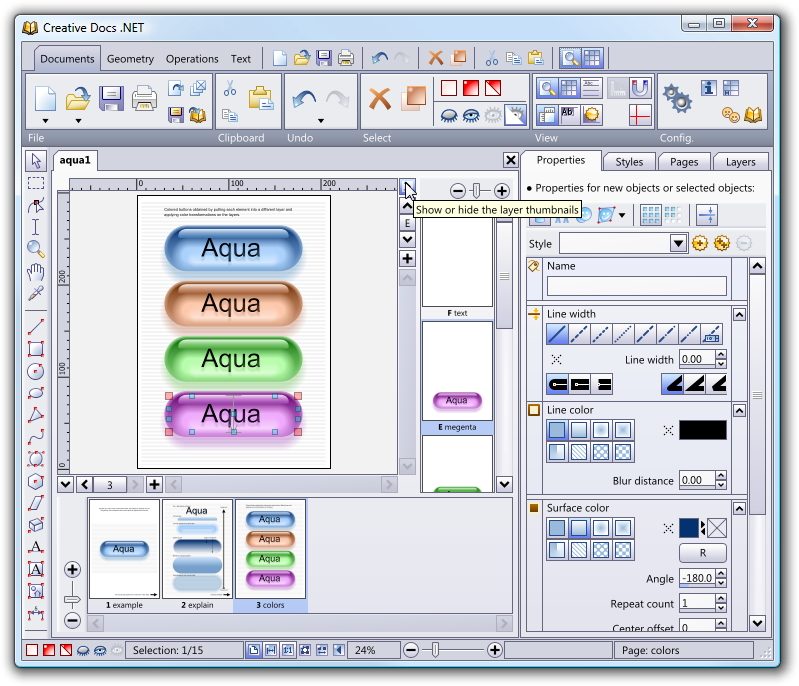
 - Automatic layer thumbnails for the active page (click on the small arrow near the top of the scroll bar, at the right of the document).
- Automatic page thumbnails for the active document (click on the small arrow near the left of the scroll bar, at the bottom of the document).
- Improved zooming with the scroll wheel; turning the mouse wheel will zoom in and out without moving the document around, if this is possible. Point the mouse to where you want to zoom in and turn the wheel.
- Tons of little fixes.
Thanks, Daniel! As always, let me know if you have any issues with this release; use the e-mail address bugs at creativedocs.net.
Friday, May 2. 2008
Ever wanted to take clean snapshots of your screen? Especially on Vista? Including the translucent window title bar and the shadows? Don't want to bother with your desktop background?
Window Clippings by Kenny Kerr is a very powerful solution which allows you to create simple snapshots, but also complex ones, e.g. with open submenus. Install the tiny piece of software and press Print Scrn.
It is not free, though. Alas. But it is worth its $18, down to the last cent.
Wednesday, April 30. 2008
I have just uploaded version 2.2.0 which is now available publicly. This version fixes a few minor problems and comes with improved paste support: - When pasting an image from the clipboard, Creative Docs .NET automatically creates a new image object, possibly scaled down to fit into the active page.
- When pasting text without being in a text object, a new text object is created, or the best text object is automatically selected and the text is inserted.
Let me know if you have any issues with this release; as always, use the e-mail address bugs at this website.
Tuesday, February 5. 2008
Epsitec SA, one of the two companies who is making the development of Creative Docs .NET possible, will be celebrating its 30 years in a few days.
In order to commemorate the heroic days, Daniel Roux, co-author of Creative Docs .NET, wrote a free software simulator of a tiny computer, the Dauphin, developed and distributed by Epsitec SA in 1978. The pages are in French or German, but those tempted to play with a primitive microprocessor might attempt to program the simulated Dauphin without reading the accompanying user's manual.
An assembly language programming contest is open until end of April 2008. The 5 best submissions will be awarded prices kindly offered by Logitech Switzerland. Good luck!
Monday, February 4. 2008
I have just uploaded version 2.1.8 which is now available publicly. This version fixes several minor problems, amongst which: - The PDF export sometimes produced images turned upside down
- Embedded fonts could not always be reopened if the font was missing on the target computer
Once more, thank you to all of you who reported bugs.
Wednesday, November 28. 2007
We released version 2.1.3 a few days ago. This is, again, mostly a bug fix release. Thank you to all the great people who report bugs and therefore contribute to build a better product.
Sunday, September 30. 2007
Download version 2.1.2 here. This is mostly a bug fix release, unless you are using it to generate PDF, in which case you should definitely switch to this 2.1.2 version.
Indeed, those of you who use the PDF export feature, will be glad to see improvements in the bleed and crop mark handling. For instance, imagine you work on a document measuring 100mmx100mm, with a 20mm area outside of the page. When you export to PDF, you specify a bleed of, say, 3mm.
The crop marks will be automatically placed just 1mm outside of the bleed box. And as you can see above, the document has some objects which protrude outside of the page. The part which exceeds the bleed box will be clipped. Here is the resulting PDF, as rendered by Acrobat:
The PDF file now also includes meta information, such as the title and the creation date.
Monday, July 23. 2007
We have fixed a few minor bugs. The most visible problem was related to how embedded document fonts were handled (I'll spare you the gory technical details). You can download Version 2.1.1.
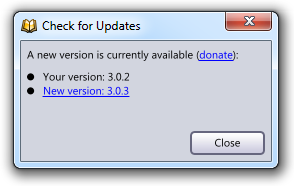
I've also decided to follow Rick Brewster's tip ( Have a Donate Button) by providing a link to the donate page when the update notification dialog appears. Let's see if this proves more effective than just the naked "Make a donation" button found on the main page navigation menu; but to know, I'll have to wait until I release a 2.1.2 version, as the new dialog won't show up for you now.
If you want to test the donate feature, you are welcome
Monday, July 9. 2007
Maxim Shemanarev, author of the AGG graphic library has just released an interesting article about font rasterization.
As a teaser, I'll just show you an image of what Maxim achieves with his graphic library and the FreeType auto-hinter, which is amazingly readable when compared with Apple's Safari way of rendering fonts (see my previous post), and has an excellent typographic layout:

I'd love to produce this kind of rendering with Creative Docs .NET. This will, however, require some work on my side: I'll have to use FreeType rather than my own OpenType glyph contour extraction code and I'll have to seriously check the performance of the new code. Rendering with ClearType like sub-pixel RGB output requires per-channel alpha blending. How does it impact performance? I've no idea.
Wednesday, June 13. 2007
Steve Jobs announced the release of Safari for Windows XP and Vista at this year's WWDC. This brings a few new pieces of Apple technology to the PC, in particular the font rendering which is used in Mac OS X. This produced quite a few interesting reactions (read Jeff Atwood's Coding Horror and Joel on Software), since Apple is using high quality sub-pixel glyph positioning.
High quality sub-pixel positioning is not compatible with crisp and pixel aligned character stems, which is the base for Microsoft's ClearType technology. Yes, I agree, Apple fonts look more blurry when compared to those rendered by Microsoft, but it cannot be avoided if you want to respect the font shape at any (possibly fractional) font size.

In Creative Docs .NET, I chose the same route as Apple: make sure that characters get positioned in the most precise way. However, my rendering algorithm simply relies on path filling as implemented by agg. I don't have access to the more subtle RGB smoothing used by both ClearType and Apple's font engine.
Monday, June 4. 2007
I finally found the time to build a public release of Version 2.1.0. There are plenty of small improvements: - The full user interface is now available in German (thanks to Thomas Efer who translated the tons of texts found in Creative Docs .NET). If your Windows Regional and Language Settings are set to German, you will automatically benefit from the translation.
- The image export filter is now much richer: you can specify if you want to export the full page, the area covered by the graphic objects (fit to objects) or only the area covered by the active selection (fit to selection). You no longer have to rely on an external bitmap editing tool to crop the image.
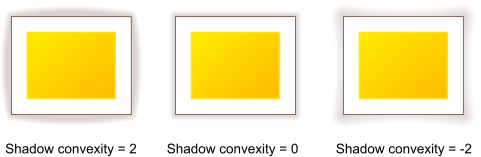
- The polygon object has now additional properties which can be used to produce various effects:
Aditionally, there were a few bug fixes. Please continue to report them to bugs at creativedocs.net.
Tuesday, May 8. 2007
I have just come across this KB article from Microsoft which lists all applications which have earned the "Certified for Windows Vista" logo. I've been very surprised to see that there are currently (May 2007) just 237 such applications. If you remove those belonging to Microsoft, the number falls to 207.
I find these numbers really amazing. What does this mean? I wonder... Are the software companies not interested by the Vista logo? Is it that hard to implement the changes required to pass the certification? It cannot be the price, as Microsoft was/is still sponsoring the certification process...
For me, going through the certification process was an interesting experience. And it forced me to better understand areas such as MSI, discover new tools (such as the Orca database editor), getting access to WinQual and, best of all, play with new technologies such as the Restart Manager.
|